

AI Agents in Business: What Agentic AI Actually Means

On this page 7 sections
The short version
- The distinction that matters: a chatbot answers and stops, an agent takes a goal, plans steps, calls tools, checks the result and loops. That is what moves automation from Q&A to whole workflows.
- The precondition is stated up front and repeated. Agents need processes somebody has actually written down and systems with real APIs. If you have neither, the process work and the plumbing are the real next step, and both are worth doing regardless of what happens to AI.
- One example you can check rather than take on trust: the AI receptionist on the contact page is live. It was built there first because an agent talking to strangers unsupervised is the hardest version of the problem.
- Four failure modes: goals too vague to specify, decisions too subjective to delegate, no feedback loop so nobody notices when it goes wrong, and integration pain, which is where most of the effort actually goes.
- On frameworks, the advice is to expect to replace them. Keep business logic on your side of the boundary and treat the model, provider and framework as swappable configuration.
The word "agent" has taken over every AI conversation in 2026. Vendors use it. Consultants use it. Your CTO probably used it in the last board deck. The problem is that most people using the word mean different things by it, and some of them mean nothing at all.
I want to cut through that. We build software for businesses in Perth and across Australia, and over the last twelve months we have gone from experimenting with AI agents to deploying them in production for real clients. This is what we have learned.
One thing up front, because it decides whether the rest of this is useful to you. Agents work when a business has processes somebody has actually written down and systems that expose real APIs. Plenty of businesses have neither yet. If that is you, the agent is not your next step. The process work and the plumbing are, and both are worth doing regardless of what happens to AI. I would rather say that at the top than bury it three sections in. I have written separately about why the order matters.
What an AI agent actually is
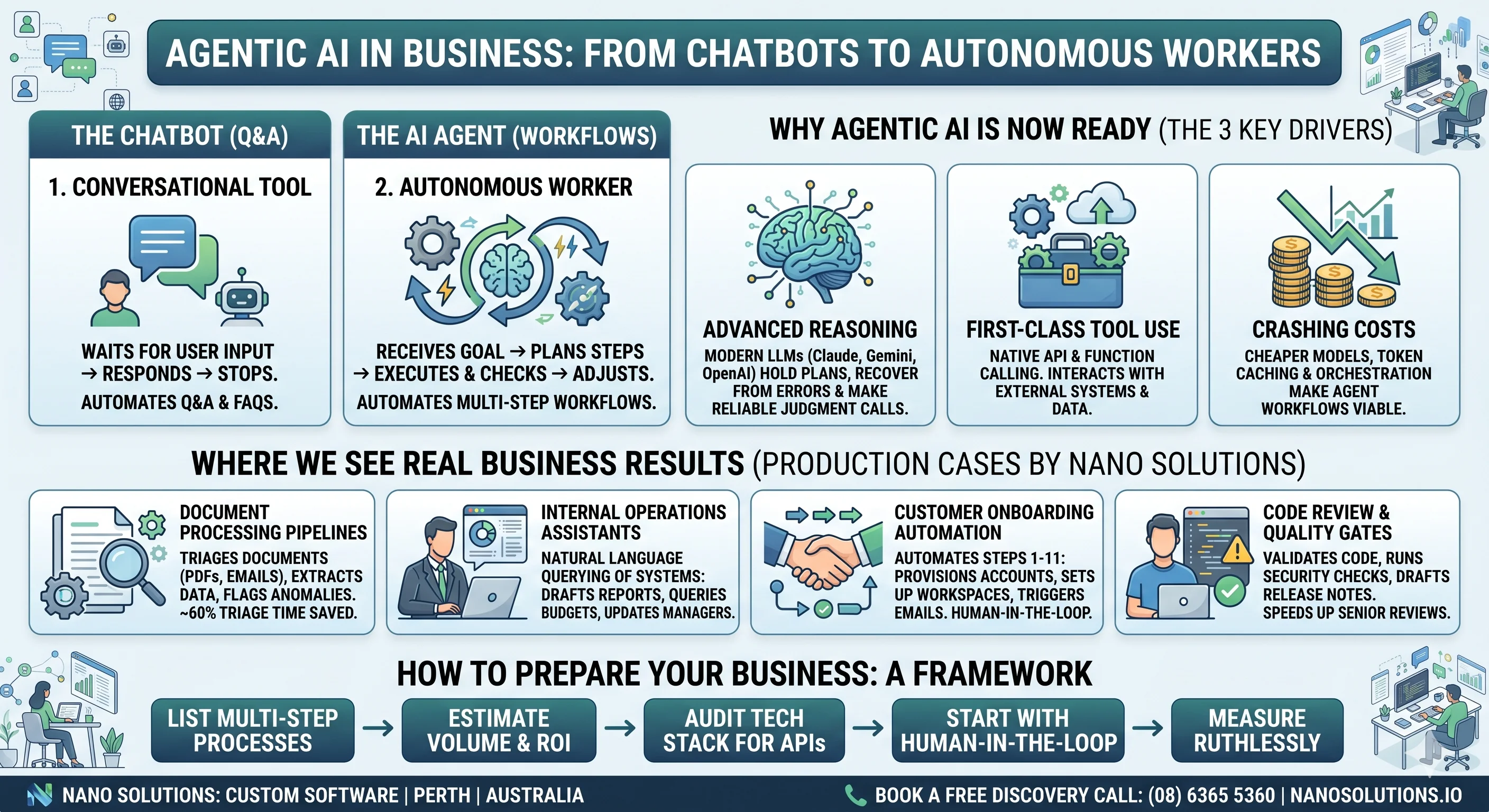
A chatbot waits for you to type something, responds, and stops. An agent does not stop. An agent receives a goal, breaks it into steps, picks the right tools, executes, checks the result, and adjusts. It loops. It reasons about what to do next. It can call APIs, read databases, send emails, update spreadsheets — whatever you wire it up to.
The difference is autonomy. A chatbot is a conversation. An agent is a worker.
That distinction matters because it changes what you can automate. With a chatbot you automate Q&A. With an agent you automate workflows — the kind of multi-step, cross-system processes that currently require a person alt-tabbing between six browser tabs.
Why now
Three things converged to make agentic AI practical for normal businesses, not just Silicon Valley labs:
-
Models got good enough at reasoning. Earlier generations could write you a convincing paragraph but fell apart across a long task. The current ones can hold a plan in their head, notice when a step failed, back up, and make judgment calls that are right often enough to be useful. That is the capability agents are built on, and it arrived recently enough that a lot of received wisdom about what AI cannot do is simply out of date.
-
Tool use became a first-class feature. Modern LLMs do not just generate text. They can call functions, use APIs, and interact with external systems through structured tool calling. This is the mechanical backbone of every agent framework.
-
Cost dropped far enough. Running an agent means making many LLM calls per task — sometimes dozens. A year ago that would have been prohibitively expensive for most business processes. Today, with cheaper models, prompt caching, and smarter orchestration, the economics work for a surprisingly wide range of tasks.
Where we are seeing real results
Here are patterns from real engagements rather than illustrations. Not all of them are finished, and one of them you can go and use yourself before you finish reading.
Document processing pipelines

An insurance company receives hundreds of claim documents a week in different formats — PDFs, scanned images, emails with attachments. Previously, a team of three people triaged, extracted key fields, cross-referenced policy numbers, and routed claims to the right department. An agent now does the first pass: it reads the document, extracts structured data, validates it against the policy database, flags anomalies, and routes the claim. The humans still review — but they review a pre-processed queue instead of a raw inbox.
The change worth measuring is not headcount. It is that work arrives already sorted, and the exceptions are flagged rather than discovered halfway through the week.
Internal operations assistants

A mid-size construction firm uses an agent that sits on top of their project management stack. A project manager can ask it natural language questions — "which projects are over budget this quarter", "draft a variation notice for the Smith St job", "summarise last week's site reports for the Monday meeting" — and the agent queries their systems, assembles the answer, and formats it. No dashboards to learn. No reports to pull. This is the kind of enterprise system integration that used to take months of custom dashboard development — now it takes a well-connected agent.
Customer onboarding automation
A SaaS company had a 14-step manual onboarding process for enterprise customers. Provisioning accounts, configuring integrations, sending welcome sequences, scheduling kick-off calls, creating Slack channels, populating a shared drive. An agentic workflow now handles steps 1 through 11 autonomously. A human picks up at step 12 for the personal welcome call and final review. If you are still running processes like this manually, it might be one of the signs your business needs custom software.
Code review and quality gates
This one is close to home. We use AI agents internally to review merge requests, run security checks, validate that code follows project conventions, and draft release notes. It does not replace a senior developer's review — but it catches the mechanical stuff before the human ever looks, which means the human review is faster and more focused on design and logic.
Inbound enquiries, and the one you can go and try
Everything above asks you to take my word for it. This one does not.
There is an AI receptionist running on our own contact page. Click the call button and you are talking to it, right now, on the site you are reading. It answers questions about what we do, works out what you actually need, and hands the conversation to a human with the context already attached. Whoever picks it up on our side gets a notification that tells them which city the caller is in, because the agent resolves that before the conversation starts rather than asking.
We built it on our own site first for a reason that has nothing to do with marketing. An agent that talks to strangers unsupervised is the hardest version of this problem, and we were not going to put a client in front of one we had not lived with ourselves.
The same shape works on written enquiries. Something arrives, whether by email, a form or a shared inbox. The agent classifies it, pulls together the context the person answering would otherwise go hunting for across three systems, attaches it, routes it to whoever should deal with it, and drafts a reply for a human to approve or rewrite. The human still sends it. What changes is that they start from a prepared position instead of a cold inbox, which is the same pattern as the claims triage above.
The precondition matters more here than anywhere else in this post. Support automation works when the answers already live somewhere an agent can reach: a knowledge base, a ticket history, documentation, a product database. If the answers live in one experienced person's head, an agent cannot help yet, and pretending otherwise produces a machine that confidently invents things. Writing the answers down is the prerequisite, and it is useful whether or not you ever automate it. We made a version of this argument years ago about email as the wrong default, long before any of this was possible.
What makes an agent fail
Not everything works. We have also seen agents fail, and the failure modes are instructive.
Vague goals. If you cannot write a clear specification for what a human should do in a workflow, an agent will not figure it out either. Agents amplify clarity and punish ambiguity.
Too many decisions. Agents work best on processes with clear rules and bounded decisions. The more subjective judgment is required — "use your gut feel", "it depends on the relationship" — the less reliable the agent becomes. You can still use AI for these tasks, but as a copilot, not an autonomous agent.
No feedback loop. An agent that does something wrong and nobody notices will keep doing it wrong. You need monitoring. You need humans reviewing outputs, at least by sampling. The agents that work well in production are the ones embedded in workflows where someone checks.
Integration pain. The unglamorous truth is that most of the effort in building an agent is not the AI part. It is the plumbing — getting access to the right APIs, handling authentication, dealing with rate limits, mapping data between systems that were never designed to talk to each other. If your business runs on systems with poor API coverage, agents become harder to deploy.

How to think about this for your business
If you are a business owner or a decision-maker wondering whether agentic AI is relevant to you, here is a simple framework:
-
List your repetitive multi-step processes. The ones where someone follows roughly the same steps every time, using multiple systems, and the outcome is fairly predictable. These are your candidates.
-
Estimate the volume. Agents shine when the volume justifies the build cost. Processing 10 invoices a month manually is fine. Processing 500 is a bottleneck worth automating.
-
Check your integration surface. Do the systems involved have APIs? Can data flow in and out programmatically? If the answer is mostly yes, an agent can probably be built. If the answer is mostly "we copy-paste from a legacy desktop app", you have a prerequisite problem to solve first — and software modernisation might be the right first step.
-
Start with human-in-the-loop. Do not aim for full autonomy on day one. Build the agent to do the work and present it to a human for approval. As trust builds and edge cases are handled, gradually increase autonomy.
-
Measure ruthlessly. Track time saved, error rates, and employee satisfaction. If the agent is not measurably better than the manual process within a few weeks, re-evaluate.
The landscape is moving fast
Building a reliable agent used to mean writing the orchestration yourself. Frameworks like LangGraph, CrewAI and Anthropic's Agent SDK have standardised a lot of that plumbing, and open protocols like MCP are starting to standardise how agents reach tools and data at all.
A word of caution about that list, though, because it is the mistake I would most like you to avoid. Every one of those is somebody's framework, and the field is moving fast enough that today's obvious choice is a reasonable candidate for next year's migration. Keep your business logic on your side of the boundary and treat the model, the provider and the framework as things you will replace. Swapping any of them should be a configuration change, not a rebuild. That is worth more to you than picking the right one now.
The useful version of "start early" is not a race. Businesses that have run even one narrow agent know things about their own processes that no vendor demo teaches, and that knowledge is what makes the second one go well. We saw the same dynamic with infrastructure automation using Ansible: the value was in having done it once, not in having done it first.
Where we come in
At Nano Solutions, we help businesses in Perth and across Australia design, build, and deploy AI-powered automation — including agentic workflows. We are not reselling a platform. We build custom software that fits your specific systems and processes, backed by secure development practices and cloud infrastructure that scales with your workload.
If you have a process that feels like it should be automated but is too complex for simple scripting, get in touch. That is exactly the kind of problem agents are built for. You can also see examples of the kind of work we do on our projects page.
Was this useful?
Thanks — noted.
Share

Petr Červenka
Petr is the founder and lead developer at Nano Solutions, a Perth-based custom software firm. With over a decade of experience building enterprise platforms for government and private sector clients, he leads delivery of complex projects across Australia.
Connect on LinkedIn